轻量高效的知识图谱RAG系统:LightRAG
RAGLLM
LightRAG是港大Data Lab提出一种基于知识图谱结构的RAG方案,相比GraphRAG具有更快更经济的特点。
架构
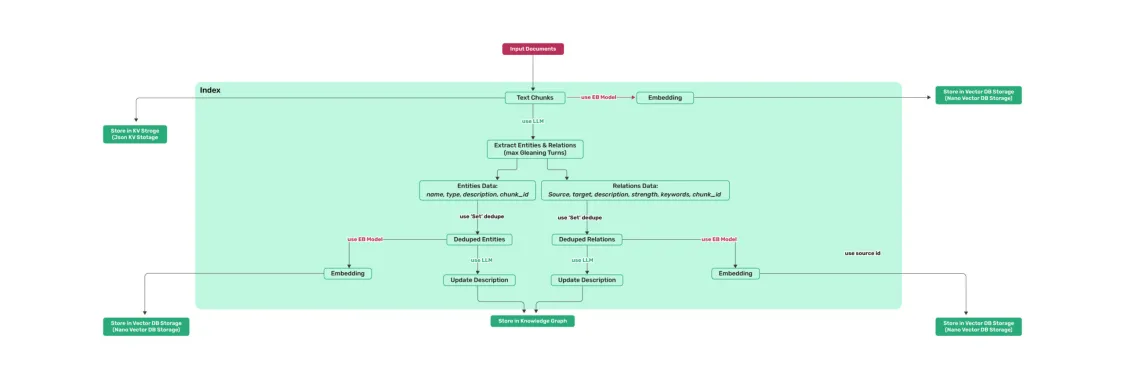
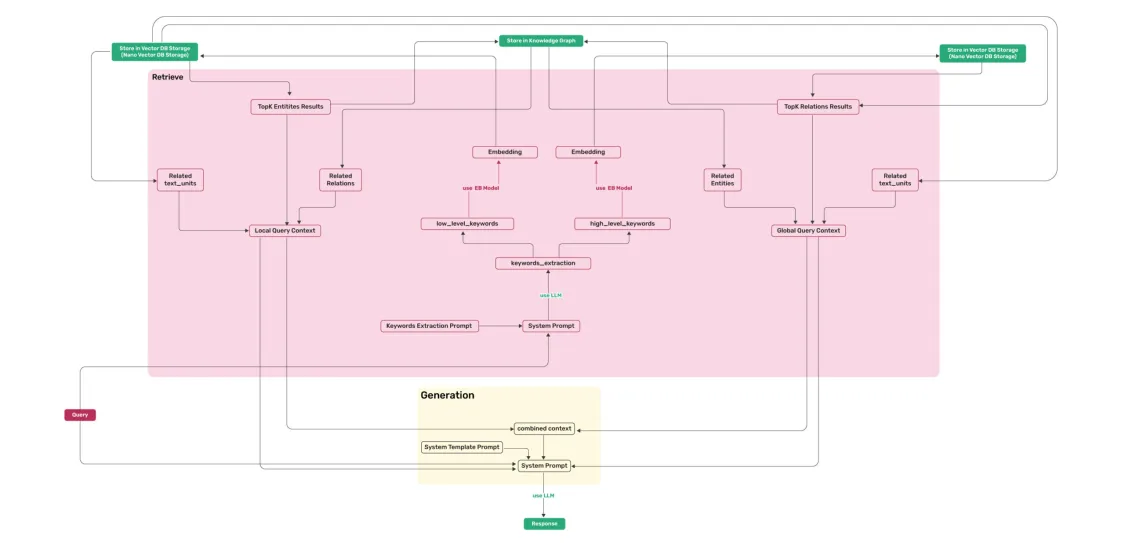
1 索引阶段:对文档进行切分处理,提取其中的实体和边分别进行向量化处理,存放在向量知识库
2 检索阶段:对用于输入分别提取局部和全局关键词,分别用于检索向量知识库中的实体和边关系,同时结合相关的chunk进行总结
下载方式
1 源码安装
cd LightRAG
pip install -e .
2 pypi源安装
pip install lightrag-hku
需要额外手动安装多个包,不太方便。建议从源码安装,可以直接下载所有依赖
模型支持
1 支持兼容openai规范的接口
async def llm_model_func(
    prompt, system_prompt=None, history_messages=[], keyword_extraction=False, **kwargs
) -> str:
    return await openai_complete_if_cache(
        "solar-mini",
        prompt,
        system_prompt=system_prompt,
        history_messages=history_messages,
        api_key=os.getenv("UPSTAGE_API_KEY"),
        base_url="https://api.upstage.ai/v1/solar",
        **kwargs
    )

async def embedding_func(texts: list[str]) -> np.ndarray:
    return await openai_embedding(
        texts,
        model="solar-embedding-1-large-query",
        api_key=os.getenv("UPSTAGE_API_KEY"),
        base_url="https://api.upstage.ai/v1/solar"
    )
2 支持hg部署模型
from lightrag.llm import hf_model_complete, hf_embedding
from transformers import AutoModel, AutoTokenizer
from lightrag.utils import EmbeddingFunc


# Initialize LightRAG with Hugging Face model
rag = LightRAG(
    working_dir=WORKING_DIR,
    llm_model_func=hf_model_complete,  # Use Hugging Face model for text generation
    llm_model_name='meta-llama/Llama-3.1-8B-Instruct',  # Model name from Hugging Face
    # Use Hugging Face embedding function
    embedding_func=EmbeddingFunc(
        embedding_dim=384,
        max_token_size=5000,
        func=lambda texts: hf_embedding(
            texts,
            tokenizer=AutoTokenizer.from_pretrained("sentence-transformers/all-MiniLM-L6-v2"),
            embed_model=AutoModel.from_pretrained("sentence-transformers/all-MiniLM-L6-v2")
        )
    ),
)
3 支持ollama模型
from lightrag.llm import ollama_model_complete, ollama_embedding
from lightrag.utils import EmbeddingFunc

# Initialize LightRAG with Ollama model
rag = LightRAG(
    working_dir=WORKING_DIR,
    llm_model_func=ollama_model_complete,  # Use Ollama model for text generation
    llm_model_name='your_model_name', # Your model name
    # Use Ollama embedding function
    embedding_func=EmbeddingFunc(
        embedding_dim=768,
        max_token_size=8192,
        func=lambda texts: ollama_embedding(
            texts,
            embed_model="nomic-embed-text"
        )
    ),
)
修改了模型需要重新构建新目录,否则部分参数会报错
基本操作
查询参数
可以设置查询时的参数,如检索模式、topk等
class QueryParam:
    mode: Literal["local", "global", "hybrid", "naive"] = "global"
    only_need_context: bool = False
    response_type: str = "Multiple Paragraphs"
    # Number of top-k items to retrieve; corresponds to entities in "local" mode and relationships in "global" mode.
    top_k: int = 60
    # Number of tokens for the original chunks.
    max_token_for_text_unit: int = 4000
    # Number of tokens for the relationship descriptions
    max_token_for_global_context: int = 4000
    # Number of tokens for the entity descriptions
    max_token_for_local_context: int = 4000

print(rag.query("What are the top themes in this story?", param=QueryParam(mode="naive")))
增量添加文档数据
与初始化图谱类似,执行insert操作即可。
with open("./newText.txt") as f:
    rag.insert(f.read())
添加自定义图谱
除了从文档创建图谱外,LightRAG还支持以离线的方式添加实体或者关系以及原始chunk。
custom_kg = {
    "entities": [
        {
            "entity_name": "CompanyA",
            "entity_type": "Organization",
            "description": "A major technology company",
            "source_id": "Source1"
        },
        {
            "entity_name": "ProductX",
            "entity_type": "Product",
            "description": "A popular product developed by CompanyA",
            "source_id": "Source1"
        }
    ],
    "relationships": [
        {
            "src_id": "CompanyA",
            "tgt_id": "ProductX",
            "description": "CompanyA develops ProductX",
            "keywords": "develop, produce",
            "weight": 1.0,
            "source_id": "Source1"
        }
    ],
    "chunks": [
        {
            "content": "ProductX, developed by CompanyA, has revolutionized the market with its cutting-edge features.",
            "source_id": "Source1",
        },
        {
            "content": "PersonA is a prominent researcher at UniversityB, focusing on artificial intelligence and machine learning.",
            "source_id": "Source2",
        },
        {
            "content": "None",
            "source_id": "UNKNOWN",
        },
    ],
}

rag.insert_custom_kg(custom_kg)
删除实体
# 删除特定名称的实体
rag.delete_by_entity("Project Gutenberg")
总结
● 在构建图谱的过程中为每个实体节点和关系边生成一个文本的键值对。每个索引键是一个单词或短语,用于高效检索,对应的值是一个经过总结外部数据后生成的文本段落,,有助于文本生成。
● 增量更新算法使得在新增文档的适合无需重新构建图谱,这使得LightRAG具有更显著的经济性和便捷性。
推荐阅读
LangGraph:基于图结构的大模型智能体开发框架
LangGraph 是LangChainAI开发的一个工具库,用于创建代理和多代理智能体工作流。

PostgreSQL 数据库向量化的核心:pgvector
pgvector是一款开源的向量搜索引擎,除了具备所有Postgres数据库的特性外,最主要的特点是能在Postgres数据库存储和检索向量数据,支持向量的精确检索和模糊检索