向量数据库Chroma学习记录
一 简介
Chroma是一款AI开源向量数据库,用于快速构建基于LLM的应用,支持Python和Javascript语言。具备轻量化、快速安装等特点,可与Langchain、LlamaIndex等知名LLM框架组合使用。
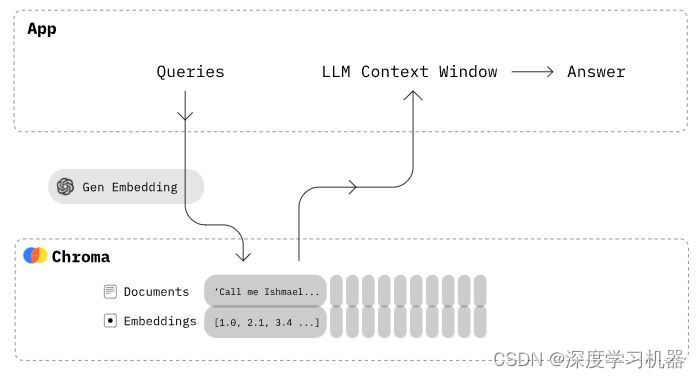
二 基本用法
1 安装
安装方式非常简单,只需要一行命令
pip instakk chromadb
2 创建一个客户端
import chromadb
chroma_client = chromadb.Client()
3 创建一个集合
这里面的集合用于存放向量以及元数据的信息,可以理解为传统数据库的一张表
collection = chroma_client.create_collection(name="my_collection")
4 添加数据
集合中可以添加文本,元信息,以及序号等数据。添加文本之后会调用默认的嵌入模型对文本进行向量化表示。 documents和ids为必需项,其他为可选项。(metadatas、embeddings、urls、data)
collection.add(
    documents=["This is a document", "This is another document"],
    metadatas=[{"source": "my_source"}, {"source": "my_source"}],
    ids=["id1", "id2"]
)
如果已经有文本的向量化表示,可以直接添加进embedding字段。需要注意手动添加的向量的维度需要与初始化集合时用到的嵌入模型维度一致,否则会报错。
collection.add(
    embeddings=[[1.2, 2.3, 4.5], [6.7, 8.2, 9.2]],
    documents=["This is a document", "This is another document"],
    metadatas=[{"source": "my_source"}, {"source": "my_source"}],
    ids=["id1", "id2"]
)
5 从集合中检索
results = collection.query(
    query_texts=["This is a query document"],
    n_results=2
)
三 进阶用法
创建本地数据存放路径
前面代码中创建的集合不会落到数据盘中,只用于快速搭建项目原型,程序退出即消失。如果想使集合可以重复利用,只需要稍微修改一下代码即可:
# Client改为PersistentClient
client = chromadb.PersistentClient(path="/path/to/save/to")
客户端/服务端部署
实际项目一般不会只有客户端代码,因此chroma也被设计成可以客户端-服务端方式进行部署
服务端启动命令:
# --path参数可以指定数据持久化路径
# 默认开启8000端口
chroma run --path /db_path
客户端连接命令:
import chromadb
client = chromadb.HttpClient(host='localhost', port=8000)
如果你负责的项目只需要维护客户端的数据,则可以安装更加轻量化的客户端chroma
pip install chromadb-client
在客户端,连接方式同前面一样。chromadb-client相比完整版减少很多依赖项,特别是不支持默认的embedding模型了,因此必须自定义embedding function对文本进行向量化表示。
创建或选择已有的集合:
# 创建名称为my_collection的集合,如果已经存在,则会报错
collection = client.create_collection(name="my_collection", embedding_function=emb_fn)
# 获取名称为my_collection的集合,如果不存在,则会报错
collection = client.get_collection(name="my_collection", embedding_function=emb_fn)
# 获取名称为my_collection的集合,如果不存在,则创建
collection = client.get_or_create_collection(name="my_collection", embedding_function=emb_fn)
探索集合
# 返回集合中的前10条记录
collection.peek()
# 返回集合的数量
collection.count()
# 重命名集合
collection.modify(name="new_name")
操作集合
增
集合的增用add来实现,前面已有,这里不赘述
查
集合的查找包含query和get两个接口
# 可以用文本进行查找,会调用模型对文本进行向量化表示,然后再查找出相似的向量
collection.query(
    query_texts=["doc10", "thus spake zarathustra", ...],
    n_results=10,
    where={"metadata_field": "is_equal_to_this"},
    where_document={"$contains":"search_string"}
)

# 也可以用向量进行查找
collection.query(
    query_embeddings=[[11.1, 12.1, 13.1],[1.1, 2.3, 3.2], ...],
    n_results=10,
    where={"metadata_field": "is_equal_to_this"},
    where_document={"$contains":"search_string"}
)
where和where_document分别对元信息和文本进行过滤。这部分的过滤条件比较复杂,可以参考官方的说明文档。个人感觉有点多余了,对于这种轻量化数据库以及AI应用来说必要性不强。
collection.get(
    ids=["id1", "id2", "id3", ...],
    where={"style": "style1"},
    where_document={"$contains":"search_string"}
)
get更像是传统意义上的select操作,同样也支持where和where_document两个过滤条件。
删
集合的删除操作通过指定ids实现,如果没有指定ids,则会删除满足where的所有数据
collection.delete(
    ids=["id1", "id2", "id3",...],
    where={"chapter": "20"}
)
改
集合的修改也是通过指定id实现,如果id不存在,则会报错。如果更新的内容是documents,则连同对应的embeddings都一并更新
collection.update(
    ids=["id1", "id2", "id3", ...],
    embeddings=[[1.1, 2.3, 3.2], [4.5, 6.9, 4.4], [1.1, 2.3, 3.2], ...],
    metadatas=[{"chapter": "3", "verse": "16"}, {"chapter": "3", "verse": "5"}, {"chapter": "29", "verse": "11"}, ...],
    documents=["doc1", "doc2", "doc3", ...],
)
自定义embedding函数
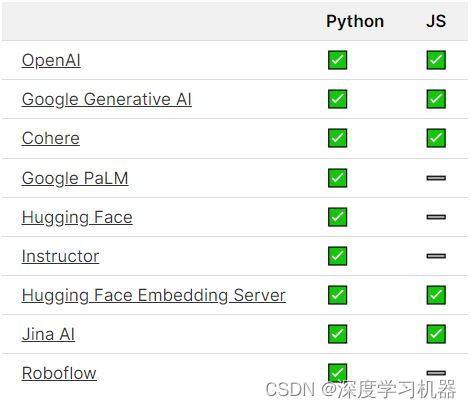
chroma支持多种向量化模型,除此之外还能自定义模型。下面是一个用text2vec模型来定义embedding function的例子:
from chromadb import Documents, EmbeddingFunction, Embeddings
from text2vec import SentenceModel

# 加载text2vec库的向量化模型
model = SentenceModel('text2vec-chinese')

# Documents是字符串数组类型,Embeddings是浮点数组类型
class MyEmbeddingFunction(EmbeddingFunction):
    def __call__(self, input: Documents) -> Embeddings:
        # embed the documents somehow
        return model.encode(input).tolist()
多模态
chroma的集合支持多模态的数据存储和查询,只需要embedding function能对多模型数据进行向量化表示即可。官方给出了以下例子:
import chromadb
from chromadb.utils.embedding_functions import OpenCLIPEmbeddingFunction
from chromadb.utils.data_loaders import ImageLoader

# 用到了Openai的CLIP文字-图片模型
embedding_function = OpenCLIPEmbeddingFunction()
# 还需要调用一个内置的图片加载器
data_loader = ImageLoader()
client = chromadb.Client()

collection = client.create_collection(
    name='multimodal_collection',
    embedding_function=embedding_function,
    data_loader=data_loader)
往集合中添加numpy类型的图片
collection.add(
    ids=['id1', 'id2', 'id3'],
    images=[...] # A list of numpy arrays representing images
)
与文本检索类似,只是变成了query_images而已
results = collection.query(
    query_images=[...] # A list of numpy arrays representing images
)
推荐阅读

Lancedb是一个用于人工智能的开源矢量数据库,旨在存储、管理、查询和检索大规模多模式数据的嵌入。Lancedb的核心是用Rust编写的,并构建在Lance之上,专为高性能 ML 工作负载和快速随机访问而设计。
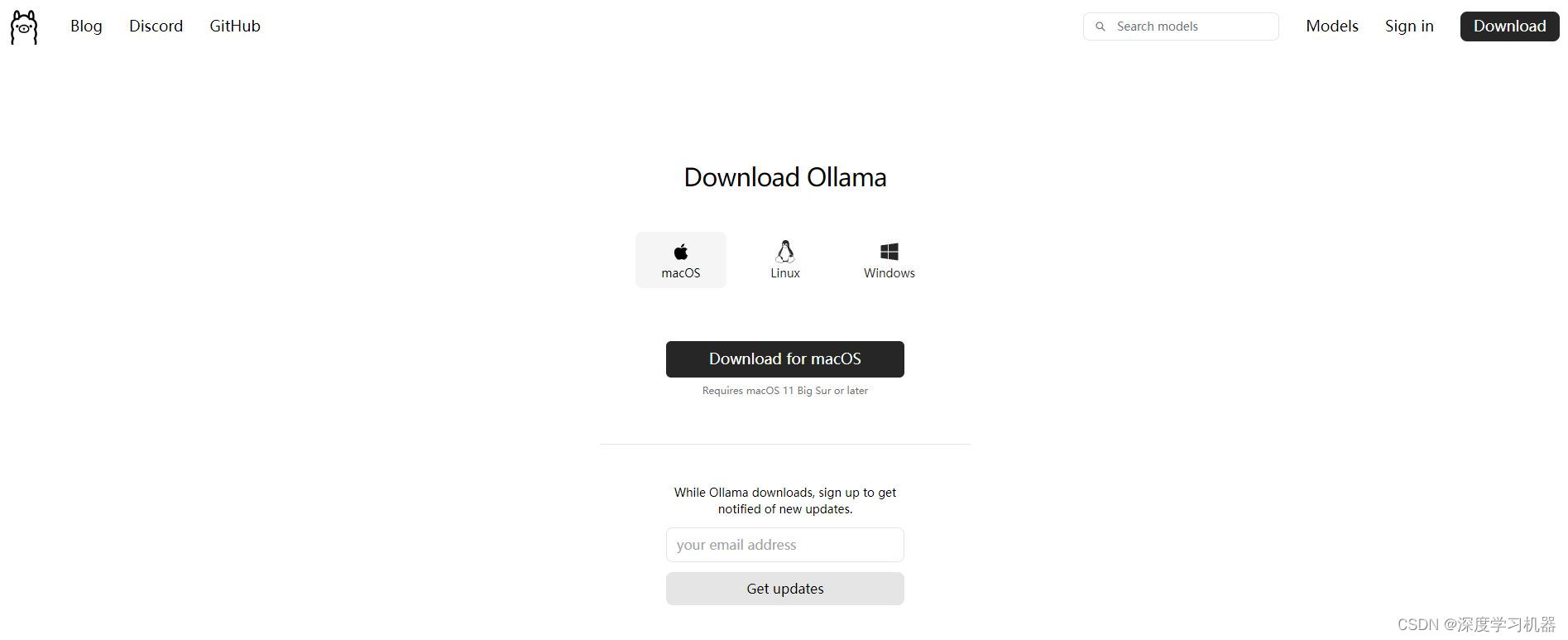
Ollama是一款免费开源的工具,拥有开箱即用的大模型,省去安装环境和下载模型的步骤,让零基础的人也能用起大模型。